Robots Helping Hands
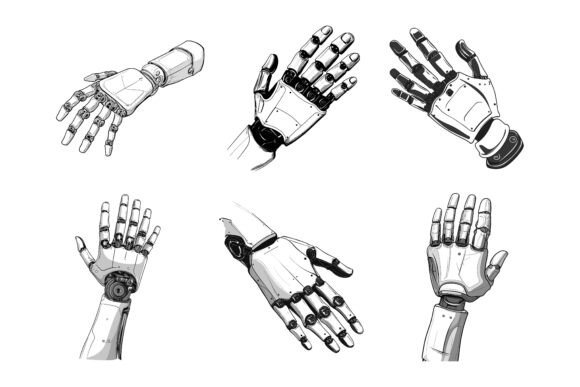
For designers, marketers, and content creators who need to communicate ideas around automation, assistance, support, or futuristic themes, finding the right visual elements can be a time-consuming step. The Robots Helping Hands vector illustration set enters the workflow at this exact point—replacing hours of searching or custom sketching with a ready-to-use, editable collection that handles the heavy lifting of asset creation. These are not generic clip art pieces; they are detailed, scalable hand illustrations with robotic flourishes, built to adapt across print, web, app interfaces, and presentation materials.
The real value starts when you open the folder. You see three formats waiting: the editable AI (Adobe Illustrator) source file, the widely supported EPS version, and a high-resolution JPG preview. Right away, you know this will work on your current machine—whether you run a Mac in a design studio or a Windows laptop for quick client revisions. The entire set is structured to let you move straight into implementation without wrestling with compatibility headaches or messy file conversions.
What Makes These Illustrations Fit a Professional Process
Most visual projects follow a predictable path: concept, rough layout, asset gathering, refinement, and delivery. The Robots Helping Hands collection slots into the asset-gathering phase, but it also influences later steps because of how the files are organized. Instead of receiving a flat, unlabeled batch of shapes, you get a neatly layered AI file where every hand pose, robotic element, and detail sits on its own named layer. This means you can isolate exactly what you need in seconds, hide the rest, and export. The consistency from one illustration to the next—same line weight, same design language, same level of detail—ensures that when you combine multiple hands in a single layout, they look like they belong together, not like a patchwork of mismatched sources.
This consistency is crucial when you are building something that must carry a brand’s tone. Whether you are illustrating a customer support chatbot, a manufacturing process infographic, a fintech app onboarding screen, or a presentation about robotic process automation, the visuals need to feel intentional. The perfection in details—every metallic rivet, every joint, every subtle shadow—means you do not have to spend extra time cleaning up edges or fixing odd proportions. You can trust the asset as-is, then freely modify colors to match your brand palette without breaking the look.
How the Workflow Changes When You Start with Organized Vectors
Imagine you are designing a landing page for a mental health app that uses a “helping hand” metaphor, but with a tech-savvy twist. You need a series of icons that depict guidance, lifting, holding, and pointing, all with a subtle robotic appearance to suggest digital assistance. Without this set, your process might involve commissioning a custom icon pack from an illustrator, which takes days and costs significantly more, or you might piece together free vectors from multiple sources, each requiring adjustments to unify the line style. With the Robots Helping Hands AI and EPS files, you pull up the layered document, duplicate the artboard, hide the layers you don’t need, and within an hour you have a cohesive icon family in PNG, SVG, and PDF formats—all from a single source.
The workflow benefit extends beyond speed. When you use a single, well-structured file, your team can apply changes globally. Need to swap the primary metallic blue to a warm teal? You open the AI file, select the global color swatch used across all hands, and change it once. Every instance updates. This is not possible with JPGs or even with poorly constructed vectors where colors are applied as direct fills rather than linked swatches. The set’s compatibility with Adobe Illustrator means you can tap into that global editing power, but even if you only use the EPS in a different vector editor, the logical grouping of paths and layers reduces repetitive work.
Practical Use Cases Across Different Media
The description mentions suitability for print, web, symbols, apps, and infographics—and that range is not marketing fluff. Here is how each plays out in a real project cycle:
Print: A brochure for a robotics startup needs full-page illustrations. You take the high-resolution AI file, scale the hands to fit a 300-dpi layout, and because they are vectors, there is zero pixelation. You adjust the line weights slightly to hold up on coated paper, export as PDF/X, and send to the printer. The same hands appear in the company’s business card design, simplified into small symbols.
Web: On a SaaS homepage, you need a hero graphic that shows a robotic hand interacting with a user interface. You export the chosen illustration as an SVG, keeping file size tiny for fast loading. Inline SVGs allow you to animate individual parts later using CSS or JavaScript—maybe the fingers tap the screen with a slight delay. The organized layers in the source file make it easy to identify which paths to animate.
Apps and Symbols: Mobile apps often use onboarding screens or status indicators. The hand illustrations can be resized to icon dimensions, recolored as needed, and exported as PDF vectors for Xcode or as adaptive SVG for Flutter. Because the set is designed with detail, even at small sizes the robotic features remain recognizable—something that lower-quality vectors lose when scaled down.
Infographics: A data-rich report on AI adoption can become visually more engaging when you use robotic hands to point at key statistics, hand off a chart, or form a frame around a callout box. The consistency lets you repeat the visual motif without it feeling repetitive. You can take one hand and flip it, rotate it, or combine it with typography, knowing the style stays intact.
Editing Without Advanced Illustration Skills
One of the stickiest points for many professionals is the gap between finding a great asset and actually being able to adapt it. The Robots Helping Hands set directly addresses this. Because colors can be changed so easily—often just by selecting a shape and picking a new fill—you don’t need to be an Illustrator expert. The layers are clearly named, so even someone who mainly works in Canva or PowerPoint can import the EPS and quickly ungroup what they need. The JPG version serves as a quick reference or can be dropped directly into a blog post draft before you commit to editing the full vector. This multi-format approach means you are not locked into a single method; the asset meets you at your skill level.
For those who do have strong vector editing skills, the files are constructed with precision. Anchor points are clean, not excessive. Curves are smooth. This matters when you need to break apart a hand to use just the finger mechanism in an icon or to combine a palm from one pose with an arm from another. The neat file and layer structure encourages experimentation rather than frustration.
Cross-Platform Reliability and Long-Term Organization
Design tools evolve, but AI and EPS remain robust, industry-standard formats. That matters for long-term projects or when handing off assets to another team member who may use a different operating system. The set is explicitly designed for both Mac and Windows users, which eliminates the dreaded “missing font” or “corrupted file” errors that can occur with poorly packaged resources. When you keep the original files in your asset library, you can return to them months later for a redesigned website or an updated product brochure and immediately proceed as if no time has passed.
From an organizational standpoint, the logical structure of the file also encourages a good habit: maintain one central “source of truth” for your illustration assets. Instead of scattering modified copies across folders named “final_final_v2,” you store the master AI file, and you export variants into project-specific directories. The clean layer names—like “hand_open_right,” “hand_point_left,” or “hand_holding_circle”—make finding the right graphic in the Adobe Illustrator Layers panel fast and intuitive.
Integrating the Set into a Typical Design Project
To see how this works end to end, consider a product launch: A mid-sized company is releasing a new customer service automation tool. The marketing team needs a consistent visual language for a press kit, a landing page, social media graphics, and a slide deck.
Initial Setup: The lead designer downloads the Robots Helping Hands collection and immediately opens the AI file on a Mac. The file structure is clear. She selects one hand, changes the base metal color to match the brand’s charcoal gray, saves the swatch, and applies it globally. In under ten minutes, the entire suite of hand illustrations now features the brand’s color scheme.
Asset Creation: She exports an SVG of the “hand_holding_device” for the website header, a high-res PNG of “hand_reaching_out” for the press release thumbnail, and the full vector set for the PowerPoint template. The slide deck designer, on a Windows PC, opens the EPS file in CorelDRAW without issues, picks the hands he needs, and places them next to key data points.
Consistency Check: Because all illustrations originate from the same well-detailed set, the line weight, shadow style, and mechanical details match across the landing page and the printed one-pager. There’s no jarring shift where vector style A clashes with vector style B—a common pitfall when pulling from multiple sources.
Last-Minute Revision: A week later, the team decides to pivot the color to a warmer metallic copper to support an updated palette. The designer opens the original AI file, adjusts the global swatch, and re-exports all formats. The entire brand update takes moments instead of requiring a new illustration order.
Why Detail and Precision Matter More Than Volume
Some illustration packs try to impress with hundreds of icons, but many of those icons are rough or rushed. The Robots Helping Hands collection takes the opposite approach: it focuses on a thematic set of hands built with perfection in details. Every joint, every panel line, every subtle gradient contributes to a look that says “professional” rather than “stock.” This is especially important when the illustration appears large—on a conference banner or a hero image. At that scale, poor curves and uneven edges become glaringly obvious. Here, the precision holds up under magnification.
Detail also means you can zoom in on a robotic finger and use just that portion as a background element, a pattern, or an avatar marker. The versatile resolution-independent nature of vectors makes such creative reuse possible, and the careful construction invites it.
The Role of Editable Assets in Maintaining Brand Voice
Brand consistency is not just about slapping a logo on everything; it is about the visual tone of every supporting element. When you use a fixed, ready-made illustration and cannot change its color or shape, it may stand out awkwardly or force you to build your whole color story around it. Because this set allows simple color changes and shape modifications, the power dynamic shifts: the illustration serves your brand, not the other way around. You can take a hand that is originally silver and make it gold, or outline the entire illustration in a neon green for a cybersecurity brand. The editability extends the lifespan of the asset across multiple campaigns with different moods.
When to Bring These Illustrations into Your Workflow
The timing of when you introduce the Robots Helping Hands set can influence project efficiency. Early in the concept stage, use the JPG previews to quickly mock up layouts in Figma or wireframes without worrying about vector imports. As you move into high-fidelity design, swap in the AI or EPS versions for razor-sharp rendering. For content that goes live repeatedly—like ongoing blog posts or recurring social media templates—keep a folder with the exported SVG symbols, so your team can drag and drop without needing to open a full editing suite. The set thus supports a “design once, reuse many times” philosophy that reduces repetitive task switching.
Making the Purchase Decision Part of a Smarter Resource Strategy
Freelancers and agencies often calculate the cost of an illustration set not by the price tag but by the time it saves. When you consider that a single custom illustration can cost hundreds of dollars and take days to receive, acquiring a professionally organized collection that you own outright, with full editing rights, becomes a strategic inventory move. The Robots Helping Hands set fits neatly into a resource library alongside UI kits, font families, and photography archives. Because it is designed for both Mac and Windows, you do not need to worry about team members being locked out due to platform differences. The JPG versions also serve as offline-ready assets for quick, non-vector tasks like pasting into an email newsletter draft.
The neat file structure encourages good housekeeping: even if you are not the one who originally downloaded the set, another team member can navigate the layers and find the right hand in moments. That reduces onboarding friction and keeps projects moving.
Extending the Illustrations Beyond the Original Purpose
Once you start working with the set, you may discover unexpected uses. The robotic hands can form the basis of an explainer video’s storyboard placeholders, act as custom cursor icons for an interactive web experience, or become the central metaphor in a printed book cover design. Because the original files are fully editable, you can deconstruct and recombine elements to create entirely new compositions. A hand holding a device could be modified to hold a piece of fruit for a health tech ad, or the mechanical plating could be isolated to create a background texture. The perfection in detail means even these extracted parts maintain a high standard.
When you combine this adaptability with the guaranteed consistency across the set, the resource becomes more than a one-time download; it turns into a reusable toolkit that adapts as your creative needs shift.
Ultimately, the Robots Helping Hands AI EPS illustration collection solves a specific, recurring problem in visual content creation: finding reliable, high-quality, editable graphics that can travel across platforms and applications without falling apart. The inclusion of AI, EPS, and JPG, the thoughtful layer organization, and the attention to consistent detail make it a practical asset for anyone who values smooth workflows and professional output. By slotting it into the right stage of your planning and design process, you spend less time fixing visual inconsistencies and more time on the message itself.