Money Bag Icons Set for Designers, Apps, and Print
Visual communication around money and savings depends heavily on symbols that people understand immediately. The money bag icon is one of those universal devices—it instantly signals wealth, profit, budgeting, investment, and financial reward. A well-made money bag icons set does more than just sit on a canvas. It becomes a flexible, reusable building block that helps a designer, marketer, or business owner talk about complex financial ideas without adding a single word. When that set combines clean vector construction, thoughtful detail, and file formats that slot into real workflows, it stops being a simple download and starts functioning as a dependable piece of your creative toolkit.
What Makes This Money Bag Icons Set Stand Out
The collection you’re looking at is part of a special AI EPS illustration series that prioritizes both visual consistency and practical usability. At its core, you receive AI EPS and high-resolution JPG files, which means you aren't locked into a single type of software or use case. The vector source files give you unlimited scaling and deep editability, while the JPG previews let you drop icons directly into a presentation slide or a quick mockup—no conversion needed. Because everything is designed for Mac and Windows users, there’s no worry about cross-platform glitches when moving between team members or shifting from one workstation to another.
One of the first things experienced designers notice is how the files are structured. Instead of a single flattened image, you’ll find a neatly organized file and layer structure. Individual icon elements, from the bag’s drawstring to the coin details and shadow shapes, sit on separate, clearly named layers. That kind of organization directly cuts down on the time you’d spend hunting for a path to recolor or resize. It’s a small, intentional choice that makes customizing an icon feel fluid rather than frustrating.
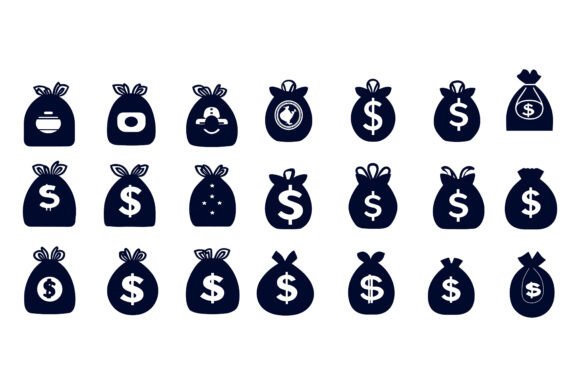
The consistency and perfection in details also set this set apart. Every money bag variant follows the same line weights, corner radii, and styling logic. Whether you choose a flat icon, a slightly shaded version, or one with a coin spilling out, they all read as part of one family. This visual harmony matters enormously when you’re placing icons inside an app interface, a financial report, or an infographic that needs to feel polished and credible.
When Every Pixel Counts: Detail That Builds Trust
Precision in icon design isn’t just about aesthetics. In financial contexts—banking apps, accounting platforms, budgeting newsletters—readers and users are subconsciously evaluating trust. Icons that are slightly off, inconsistent in stroke width, or awkwardly scaled can chip away at that professional impression. The money bag icons set here is built with close attention to pixel alignment and clean geometric forms. This makes the icons equally sharp on a 4K monitor, a smartphone screen, or a printed flyer at 300 dpi.
Because the artwork is vector-based, you can scale a single icon up to poster size or shrink it down to a tiny app tab icon without any loss of quality. The edges stay crisp, and the intended details stay legible. For a designer working on a multi-platform financial product, that’s a massive time saver. You don’t need to create separate raster versions for different contexts, and you don’t have to worry that a symbol will become unrecognizable at 16×16 pixels as long as you choose the right variation from the set.
From Budgeting Apps to Print Brochures: Real-World Integration
The true test of an icon set is whether it fits into the messy, everyday work of real projects. This set is designed to be suitable for print, web, symbols, apps, and infographics right out of the box. Let’s look at a few practical scenarios where that flexibility pays off.
- Fintech and budgeting apps: You need an icon for savings goals, investment portfolios, and transaction categories. The money bag icons can be used as tab bar icons, feature highlights, or category markers, maintaining the same clean style across the entire UI.
- Marketing materials for financial advisors: A printable handout or a PDF guide that explains retirement saving strategies can use these icons next to key statistics, helping readers scan and remember the information faster.
- E-commerce and loyalty programs: When you’re showing discount amounts, cashback rewards, or membership savings, a money bag icon next to the value instantly reinforces the benefit without needing extra text.
- Educational infographics and blog posts: Writers and content creators explaining compound interest, budgeting methods, or saving tips can embed these icons to break up text and create a more engaging reading flow.
- Presentations and pitch decks: Adding a simple, professional icon to a slide about revenue projections or cost savings gives a visual anchor that makes the data feel more accessible.
In every one of those situations, the JPG version lets non-designers quickly drag an icon into PowerPoint, Google Slides, or a blog post. At the same time, the AI EPS files allow the design team to customize the icon to match the exact brand palette and style guidelines. You’re free to edit it, change colors, and modify the icon so easily according to your needs without starting from a blank artboard.
Customizing Vector Icons to Reflect Your Unique Brand
A stock icon set becomes truly valuable when it bends to your brand, not the other way around. With the layered AI EPS structure, you can isolate the icon’s fill, stroke, highlights, and background elements independently. Need to adopt your company’s specific blue gradient for the bag body while keeping the coin a warm gold? That’s a matter of selecting the right layer and updating the color value. Want to remove the shadow to fit a flat design system? Simply hide that layer. The possibilities extend to reshaping certain details, like adjusting the currency symbol on the bag or even combining parts from different icons to create a completely new variation—all while staying within the same aesthetic universe.
This adaptability is especially helpful for teams that maintain a design system. Instead of commissioning a custom illustration for every new financial concept, you can pull from this money bag icons set, apply the system’s color tokens, and export the icon in a few clicks. The consistency you get across the entire set means that even after edits, the icons still look like they belong together. That’s a subtle but powerful advantage when you’re trying to build a coherent user experience across a website, a mobile app, and printed brochures.
Who Gets the Most Out of a Comprehensive Icon Set
This kind of vector illustration collection appeals to a wide spectrum of people, but it’s especially practical for a few specific groups.
Freelance designers and small studio owners often juggle multiple clients and tight deadlines. A ready-made, well-organized icon set that works across platforms cuts down on repetitive illustration work. Instead of drawing a money bag from scratch for a client’s invoice template or mobile app screen, they can open the file, adapt the colors, and deliver a polished result faster.
Digital marketers and content creators who are responsible for producing regular visuals—social media graphics, email headers, lead magnets—will find the JPG and vector combination especially useful. They can place the JPG directly into quick-turnaround social posts while saving the EPS file for a future website update that requires on-brand vector icons.
Small business owners and entrepreneurs who handle their own visual content often lack advanced design software. For them, the high-resolution JPG versions serve as immediate, professional-looking graphics for flyers, price lists, or loyalty cards. If they later decide to hire a designer, the source AI EPS files are there, ready to be taken further without any loss in quality.
Educators and financial literacy bloggers benefit from the set’s clear, easy-to-recognize symbols. Instead of hunting for free icons that may be low resolution or inconsistently styled, they have a cohesive set that works across worksheets, slide decks, and web graphics, making learning materials look more professional without a steep editing curve.
Making an Informed Choice: Ready-Made vs. From Scratch
No design resource is a one-size-fits-all solution, and it’s worth thinking about when a pre-made money bag icons set serves your project best and when a fully custom illustration might be necessary. This set delivers exceptional detail, neat organization, and a consistent visual language, making it a strong fit for most financial branding, UI, and publication needs. However, if your brand relies on an extremely specific, hand-drawn illustration style or requires complex metaphor combinations that don’t exist in any standard icon collection, you might eventually need a custom illustrator to build on top of what this set provides.
For the vast majority of scenarios—updating a dashboard, designing a savings plan brochure, creating a rewards program interface—the combination of editability and cross-platform compatibility makes this collection a highly practical choice. The AI EPS layer structure gives you enough creative control that many projects will never need to go beyond adapting the included icons. When you compare the hours saved against the cost of new illustration work, it’s easy to see why professionals keep this kind of set in their asset library and return to it often.
Before committing to any icon set, it’s wise to check that the file formats align with your software. This set is specifically built for both Mac and Windows users, and the AI EPS files open in industry-standard vector editors like Adobe Illustrator, Affinity Designer, CorelDRAW, and some free alternatives. If your current tool can import EPS, you’re set. The included JPG acts as a failsafe, ensuring you always have a usable image, even without vector editing experience.
Building a Visual Vocabulary That Works Hard for You
Icons are more than decoration. In financial communication, a well-chosen money bag symbol can guide attention, reinforce a message, and help audiences remember key points. When that symbol is part of a larger, consistent set, you’re building a visual vocabulary that works across your entire project. The time saved by having neatly organized, perfectly detailed, and fully editable icons is time you can invest back into refining the user experience, improving the copy, or testing different design variations.
A money bag icons set that combines AI EPS, JPG, cross-platform compatibility, and a layered, easy-to-edit structure is a quietly powerful asset. It takes a universal financial symbol and turns it into a flexible tool that adapts to your brand, your medium, and your specific message. Whether you’re crafting a new feature for a fintech app, illustrating a blog post about personal savings, or preparing a print campaign for tax season, having a set like this at your fingertips can make the difference between scrambling for a suitable graphic and confidently moving forward with a professional, cohesive look.